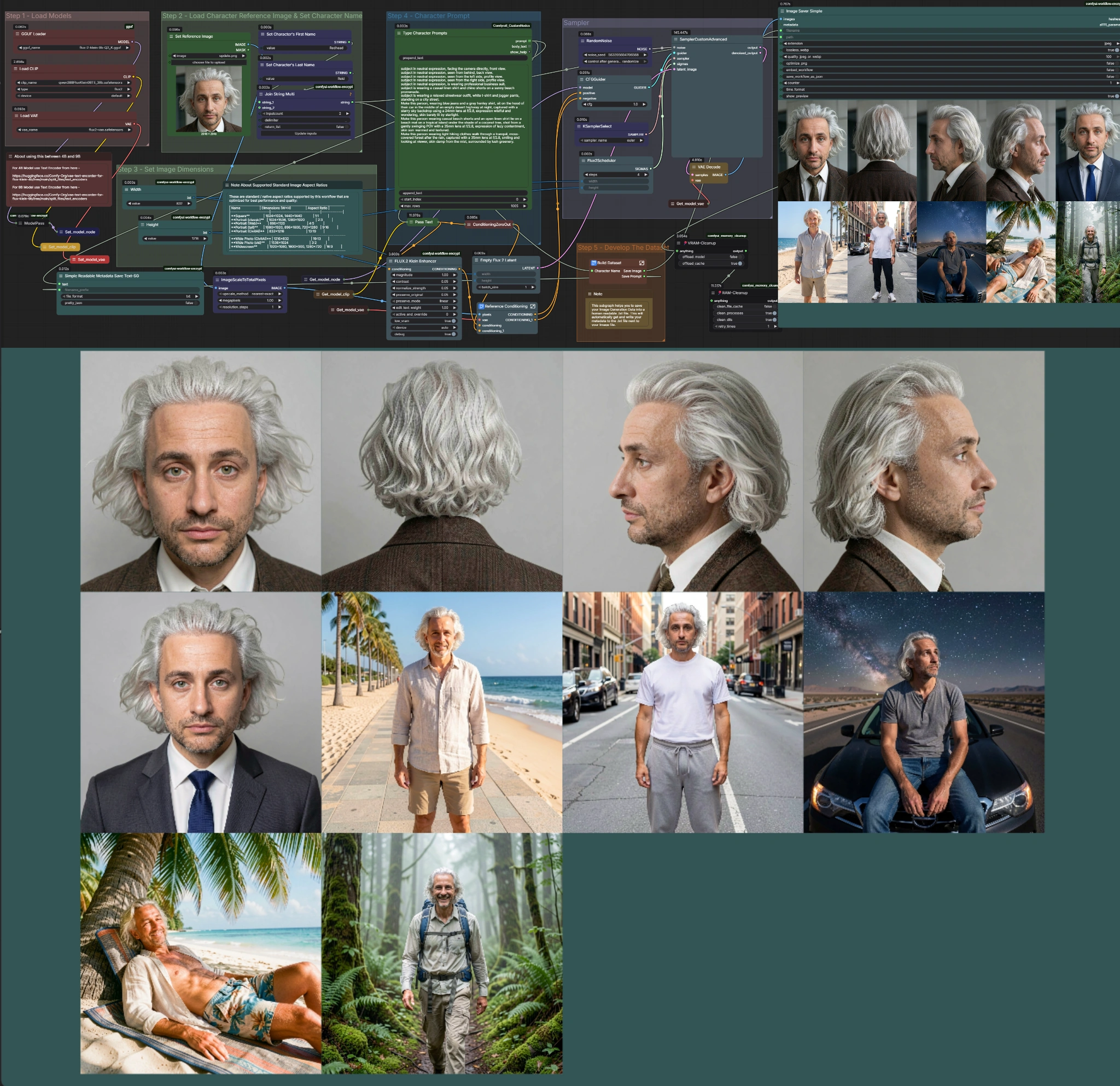
🎨 Flux.2 Klein: Consistent Character Dataset Builder for ComfyUI
A workflow by Sarcastic TOFU that builds a complete dataset for training your own LoRA model from a single reference photo — fast, simple, and even on a weaker GPU.
Want to train a LoRA model on your own character but don't want to deal with complex pipelines, dozens of settings, and hours of waiting? This workflow is exactly for you. It's designed to be accessible to complete beginners — yet powerful enough for advanced users.
🎯 What it is and why it's different
Flux.2 Klein Consistent Character Dataset Builder (Flux.2_Klein_CCDB_v1) is a ComfyUI workflow by Sarcastic TOFU that uses the Flux.2 Klein model (4B or 9B) to build consistent character datasets directly from a single reference image. The results can then be used to train your own LoRA model.
Unlike older approaches using SDXL or standard Flux, there are no lengthy processes here. Flux.2 Klein is architecturally designed to naturally preserve and reuse character details from a reference image — without the need for complex configuration.
This is an improved adaptation of the author's earlier similar workflows based on QWEN Image Edit and Kontext — with significantly better speed and output quality.
⚡ What Flux.2 Klein actually is
Flux.2 Klein 4B and 9B are a new family of high-speed AI image generators using a rectified flow architecture that unifies image generation and professional-grade editing into a single, compact package. Thanks to step distillation, the model can produce high-quality images in just 4 steps — orders of magnitude faster than older models requiring dozens of steps.
- Model 4B — Apache 2.0 license, free for personal and commercial use
- Model 9B — Non-Commercial License, for research and personal projects
- Supports 11 native aspect ratios, outputs up to 4 megapixels (2048×2048)
- FP8 version is ~1.6× faster and saves 40% VRAM compared to the full model
- NVFP4 version is up to 2.7× faster and saves 55% VRAM
🖥️ GPU requirements and available models
The workflow is designed to run on the widest possible range of hardware:
- 2–4 GB VRAM — lightest GGUF versions of Flux.2 Klein 4B (Q2 or Q3)
- 6–8 GB VRAM — Flux.2 Klein 9B Q2 GGUF (used by the workflow author himself on an AMD GPU)
- 8–12 GB VRAM — Flux.2 Klein 4B full model or Q4/Q8 GGUF versions
- 12 GB+ VRAM — full unquantized Flux.2 Klein 9B for best results
The author himself used Flux.2 Klein 9B Q2 GGUF on an AMD GPU with 8 GB VRAM during development — with excellent results. If you have a stronger card, simply swap the model for a higher quantization or the full version.
🚀 How to get started — step by step
1. Preparation and installation
- Install the GGUF addon for ComfyUI via ComfyUI Manager
- Create an account on Hugging Face — you'll need it to download the models
- Download your chosen Flux.2 Klein GGUF model and text encoder, place them in the correct folders
2. Model selection
- Select the desired Flux.2 Klein GGUF file (4B or 9B) directly in the workflow
- If you have a stronger GPU, you can swap the files for full unquantized versions
3. Reference image and character name
- Upload one clean reference photo of your character
- Enter the character's first and last name — the workflow uses them to organize the output
4. Image dimensions
- Set common dimensions for the entire dataset (768×1024 is a good starting point for portraits)
- A brief dimension guide is available directly in the workflow's notes section
5. Prompt batches
- Enter instructions in natural language: "subject seen from the left side", "Make this person wear a blue jacket"
- The workflow archive includes ready-made .txt files with prompts for poses and outfits
- Add common negative filters or use the included default values
6. Sampling and running
- Set the sampling method, CFG, and step count — or leave the default values as they are
- Hit Run and wait — the workflow is fast
- Output is automatically saved to the
output/FirstnameSurname/folder
💾 Prompt Saver — why it matters
A key feature of this workflow is the automatic saving of prompts to human-readable .txt files. Every generated image gets a corresponding text file with all metadata and the prompt used.
This is a crucial advantage when training LoRA: your dataset folder is immediately ready to use — images and their captions are paired, named, and organized. No need to manually add captions after the fact.
💡 Tips for better results
For beginners
- Start with 6–10 images, not 20 — verify quality and consistency first
- The reference photo should be clean, ideally without a busy background
- Describe what you want to see — not what you're imagining in your head
- Use the included .txt prompt files as a starting point
For advanced users
- Experiment with the CFG scale for varying levels of output variability
- Combine different sampling methods (DPM++, Euler) for a more diverse dataset
- Generate part of the dataset with one lighting style, part with another — training benefits from diversity
- For best consistency, use Q4 or Q8 GGUF versions instead of Q2
✅ Summary of advantages
- ✅ Works from a single reference photo with no complex setup
- ✅ Natural language instead of technical prompts — accessible to beginners
- ✅ Automatic prompt and metadata saving = dataset ready for training
- ✅ Excellent character detail preservation thanks to Flux.2 Klein's architecture
- ✅ Runs even on older AMD GPUs with 6–8 GB VRAM
- ✅ Significantly faster than older methods using SDXL or standard Flux
⚠️ Things to watch out for
- ⚠️ Install GGUF support via ComfyUI Manager before running the workflow
- ⚠️ A Hugging Face account is required to download models and text encoders
- ⚠️ Model files must be placed in the correct ComfyUI folders
- ⚠️ A clean reference photo without a busy background = better, more consistent results
- ⚠️ The 9B model is for non-commercial use only — for commercial projects use the 4B version
📦 Where to find the workflow
The workflow is available on Civitai by Sarcastic TOFU. It is currently in Early Access — it will be available for free soon. The archive also includes ready-made .txt prompt files for poses and outfits that will significantly speed up your dataset building process.