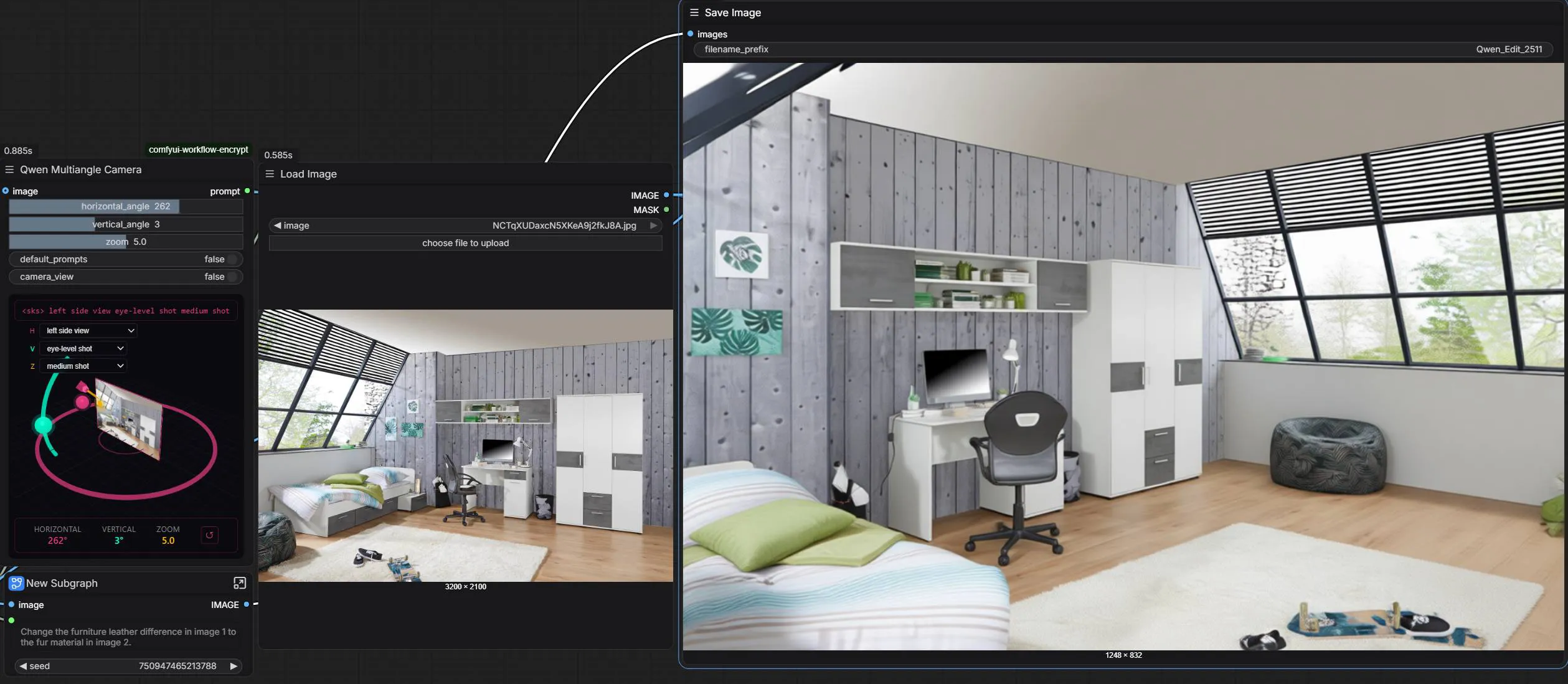
A new ComfyUI node enables changing camera angle and zoom without prompts
I came across a great node for ComfyUI that significantly simplifies working with a scene. Just insert an image and use sliders in a dedicated node to change the camera angle or zoom. No prompts, no text tweaking — simply rotate the scene and generate a new view. It works surprisingly well.
How it works in practice
The only drawback I noticed occurs when rotating the camera fully to the back. The model sometimes fills in details based on what it sees from the front. One frame later, however, it usually corrects itself and the result becomes accurate, so it remains perfectly usable.
It is finally a simple way to quickly obtain a different view of the same image, place, object, or person.
Ideal use cases
- 🎥 adjusting the first and last frame of a video
- 🎬 subtle camera animation
- ⚡ dynamic camera transitions
- 🖼️ perspective changes for a static image
A similar effect can be achieved with Nano Banana, but that requires crafting prompts. Here you only rotate the camera.
Local operation with no fees
The entire solution runs on the open source Qwen Image Edit 2511 model combined with a special node, and most importantly operates completely locally, with no fees of any kind.
In my view, it is a truly excellent tool that significantly expands the possibilities of working with images and video in ComfyUI.