
Higgs Audio v3 is one of the best open speech synthesis models available — I covered it separately. Between stating that a model is good and actually using it every day, however, sits a practical obstacle: it is driven from the command line or through a ComfyUI workflow, and Czech text has to be prepared by hand so that a date is read as a date rather than a string of digits.
That is why I built Higgs Audio Studio around it — a web interface that turns the model into a finished tool. It is fully localised in Czech and runs exclusively on your own machine. No cloud, no sign-up, no recording sent to somebody else's server.
Nine tools in one interface
The left panel groups the tasks that come up most often around speech synthesis:
- Text to speech — the core mode. Long texts are split automatically every 45 words so the model keeps its flow.
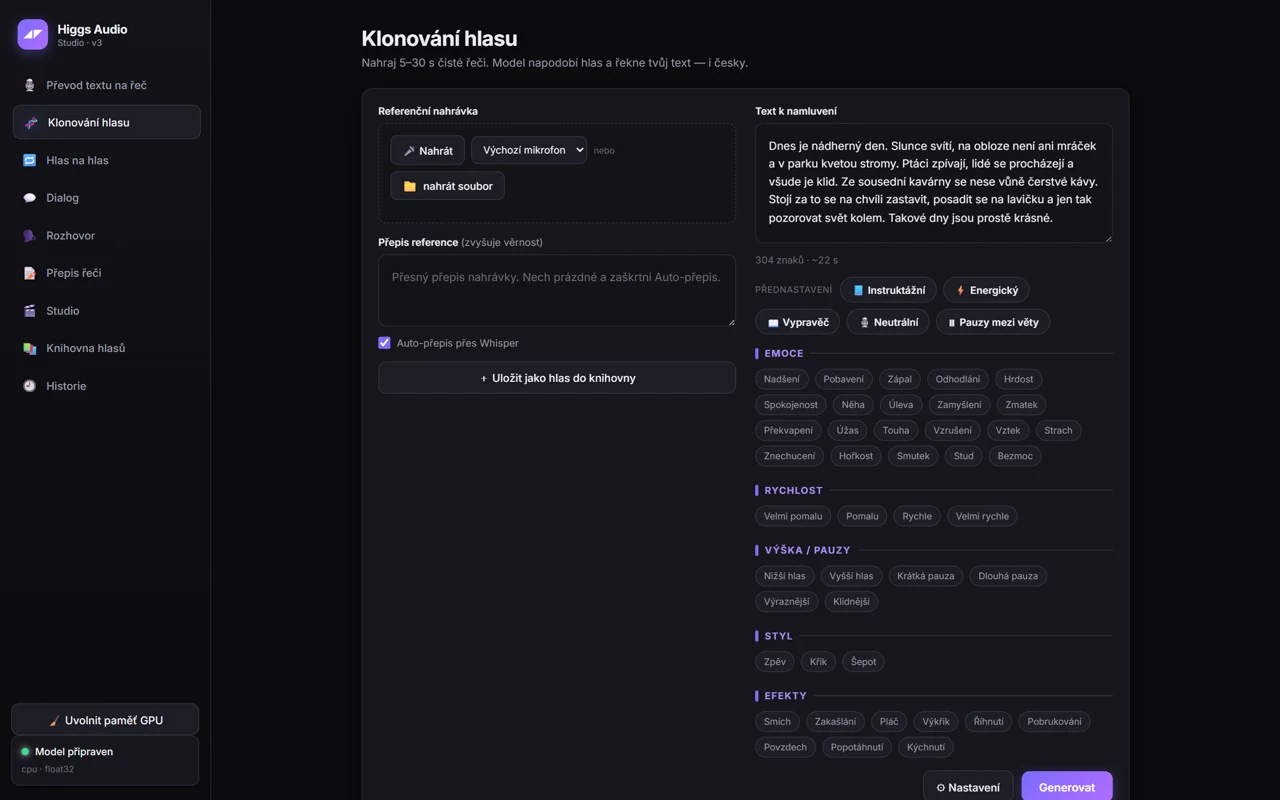
- Voice cloning — from a sample 5 to 30 seconds long. Whisper transcribes the recording in the background, which noticeably improves fidelity.
- Voice to voice — you speak a line in your own voice and it comes out in a voice from the library. Useful wherever precise intonation matters more than the words.
- Dialogue — a scene for up to six characters, each with its own voice.
- Conversation — connects to a locally running Ollama, with answers spoken in a cloned voice.
- Transcription, a Studio mode for assembling longer projects block by block, a Voice library and a History with playback, favourites and export.
Six ready-made Czech voices ship with the installation — Eva, Marek, Bára, Viktor, Lucie and Filip — so the first output takes no recording of your own.
Emotions as buttons, not as syntax
Delivery in Higgs Audio is controlled by tags inserted directly into the text, for example <|emotion:elation|> or <|style:whispering|>. Memorising them is needless overhead, so the interface offers them as buttons: 21 emotions from elation to helplessness, tempo, pitch, pause length, style (singing, shouting, whispering) and sound effects such as laughter, crying or a sigh. A click inserts the tag at the cursor.
The biggest time-saver, though, is the Director button. It generates the same sentence in four emotions at once and lets you choose. Listening to four variants side by side is more reliable than predicting in advance whether a line should sound determined or proud.
Czech as the default, not an afterthought
This was the main reason the interface exists. Models trained predominantly on English fail at things that look trivial: dates, numerals, currencies and abbreviations. Written as "12. 3. 2026", a date has to be spoken as "the twelfth of March, twenty twenty-six".
The application therefore normalises the text into the form in which it is actually pronounced, and offers a pronunciation preview — before you hit generate, you see exactly what the model will receive. A custom pronunciation dictionary handles names and technical terms the model would otherwise mangle. For technical texts and foreign surnames, that is the difference between a usable and an unusable result.
Installation
The goal was that nobody should have to deal with virtual environments and library versions. The procedure has three steps:
- Install Python 3.13 and tick the option to add it to PATH.
- Download the repository (Code → Download ZIP, or
git clone). - Run
Nainstalovat-Higgs.bat.
The installer checks the graphics card, installs the dependencies (roughly 3 GB), downloads the model (9 GB) and builds the preset voices. Depending on your connection this takes 10 to 40 minutes. Then run Spustit-Higgs-Studio.bat, a browser opens at 127.0.0.1:7860, and after about half a minute the status reads "Model ready". The model is not gated, so no account or access token is required.
Requirements and known limitations
The interface needs an NVIDIA graphics card with 12 GB of VRAM. Development ran on an RTX 4060 Ti with 16 GB, where the model occupies about 8.6 GB and Whisper another 1.6 GB. When memory is tight, the launcher enables int8 quantisation by default and the footprint drops to roughly 5.3 GB. Budget 11 GB of disk space. Running on the CPU is technically possible, but generating a single sentence takes minutes, so it serves no practical purpose.
Three situations cause the most trouble in practice:
- The transformers library version must sit between 5.3 and 5.5. Anything newer or older fails to load the model. If the application breaks after an update, check this first:
pip install "transformers>=5.3,<5.6". - Exporting to MP3 and OGG requires FFmpeg in PATH. WAV always works, so without FFmpeg you lose no output, it is merely larger.
- The Conversation tab is inactive without a running Ollama. A smaller model suffices, for example
ollama pull gemma3:4b.
Generation runs at around 24 tokens per second — adequate for local use, though not instant. The default temperature of 0.8 suits most texts; 0.6 stabilises delivery, while 1.0 to 1.1 makes it more expressive.
Two layers of licensing
This part is often oversimplified, and that is a mistake. The application code is MIT licensed and you may use it freely. The model weights, however, fall under Boson AI's research and non-commercial licence, which is a different thing entirely.
In practice this means you may not run the model as an API or SaaS, embed it into a third-party product, redistribute its weights or train your own models on them. The so-called Creator Use Grant, on the other hand, explicitly allows you to monetise the generated audio — in a podcast, on YouTube or on social media — provided you state that the audio was created with Boson AI's Higgs Audio. For content creators, that is the sentence that matters.
Responsibility when cloning a voice
A voice is biometric data and, at the same time, a personality right protected by the Czech Civil Code. Cloning someone else's voice without consent is not permissible, and from August 2026 the AI Act requires synthetic audio to be labelled. Cloned voices stay stored exclusively on your own disk and are never sent anywhere — but responsibility for whose voice you feed into the application rests with the user.
If you only want to hear how Czech from Higgs Audio sounds, start with the preset voices and the Director button — within a few minutes you will know whether it is worth tuning further. For Czech subtitles on the same video there is a separate tool.
Repository: github.com/Promptlab37/higgs-audio-studio-webui (code MIT, free)
